


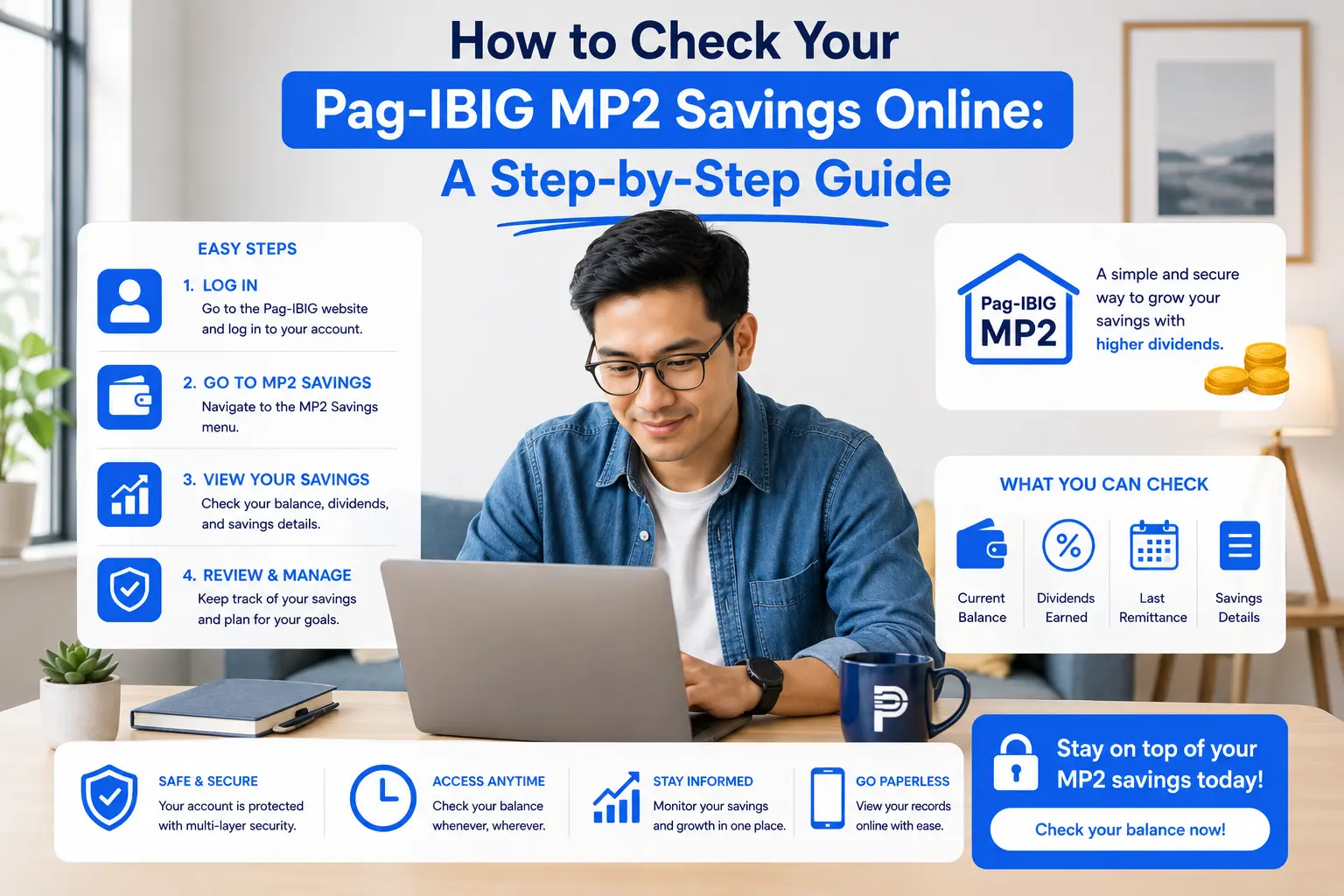
If you have a Pag-IBIG MP2 account, you do not have to visit a Pag-IBIG branch just to see how much you have saved.
You can check your Pag-IBIG MP2 savings balance online through Virtual Pag-IBIG, the Virtual Pag-IBIG mobile app, or the eGovPH app. These options make it easier to monitor your contributions, dividends, and total MP2 savings from your phone or computer.
The Virtual Pag-IBIG app is the official mobile app of Pag-IBIG Fund and allows members to view their MP2 savings growth and annual dividends.
For most members, the Virtual Pag-IBIG website provides the most detailed view of the MP2 account, including contribution information and accumulated dividends.
This guide walks you through each method and explains what the numbers on your MP2 record mean.
Key Takeaways
- You can view your Pag-IBIG MP2 savings balance online through Virtual Pag-IBIG or the eGovPH app.
- The Virtual Pag-IBIG website provides detailed MP2 information, including your initial and latest remittance dates, number of contributions, total contributions, dividends, and total savings.
- The Virtual Pag-IBIG mobile app lets you quickly monitor your MP2 savings and annual dividends from your phone.
- The eGovPH app provides another convenient way to access your Pag-IBIG MP2 record.
- If a recent payment is not showing yet, it may simply need time to be posted to your MP2 account.
- Your Total Savings is more useful for tracking your current MP2 value than looking at contributions alone because it includes credited dividends.
What Is Your Pag-IBIG MP2 Savings Balance?
Your Pag-IBIG MP2 savings balance represents the amount recorded in your MP2 account, including your contributions and credited dividends.
For example, suppose you have contributed:
| MP2 Account Detail | Amount |
|---|---|
| Total Contributions | ₱100,000 |
| Total Dividends | ₱7,000 |
| Total Savings | ₱107,000 |
In this simplified example, your original contributions are ₱100,000, while your account has accumulated another ₱7,000 in dividends.
Your actual figures will depend on your contribution schedule, account timing, and the dividends credited to your account.
This is why checking your MP2 record periodically can be useful. Instead of only tracking how much money you personally deposited, you can see how your savings have grown.
If you want to estimate how your contributions and potential dividends could grow over time, you can also use the Pag-IBIG MP2 Savings Calculator.
How to Check Pag-IBIG MP2 Savings Online
There are three convenient ways to view your MP2 savings:
- Virtual Pag-IBIG website
- Virtual Pag-IBIG mobile app
- eGovPH app
The first option is particularly useful if you want to see more detailed information about your account.
Method 1: Check Your MP2 Savings Through the Pag-IBIG Website
The Virtual Pag-IBIG website is the most straightforward option if you are using a computer.
You can access the login page here:
Once you are logged in, follow these steps.
Step 1: Log in to Virtual Pag-IBIG
Open the Virtual Pag-IBIG login page and sign in using your registered account.
Make sure you are using the official Pag-IBIG website before entering your login information.
If you are accessing Virtual Pag-IBIG from a bookmarked page or search result, check the website address carefully.

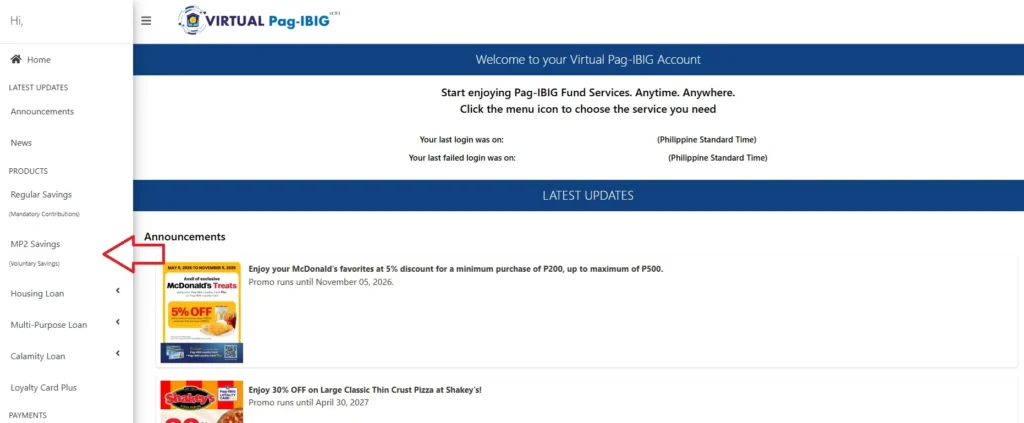
Step 2: Go to MP2 Savings
After logging in, look for MP2 Savings.
Select it to open your MP2 account information.
If you have multiple MP2 accounts, you may see more than one account associated with your Pag-IBIG membership.
Step 3: Click “View”
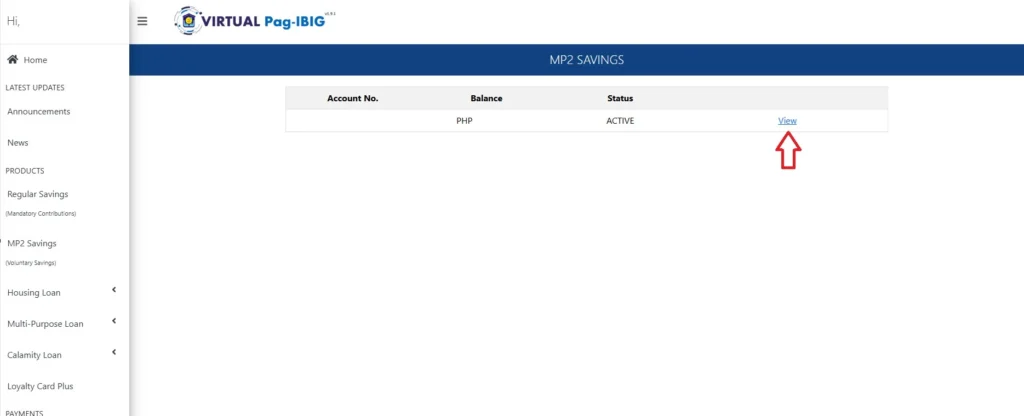
Click View beside the MP2 account you want to check.
You should then see information about your account, including your contribution and dividend records.
This is where the website becomes particularly useful because you can see more than just one balance figure.
What Information Can You See in Your MP2 Account?
When you select MP2 Savings > View, you can see several important details about your account.
Here’s what each one means.
| Information | What It Tells You |
|---|---|
| Initial Remittance Date | When your first MP2 remittance was recorded |
| Last Remittance Date | Date of the latest remittance reflected in your account |
| Total No. of Contributions | Number of contributions recorded |
| Total Contribution | Total amount you have deposited into MP2 |
| Total Dividends | Dividends credited to your MP2 account |
| Total Savings | Your accumulated MP2 savings, including credited dividends |
Initial Remittance Date
The Initial Remittance Date tells you when your first MP2 contribution was recorded.
This is useful when tracking the age of your account and planning for maturity.
Remember that opening an MP2 account and making your first contribution are not necessarily the same thing. Your actual MP2 savings activity begins when your first contribution is recorded.
If you are still learning how MP2 works, you can read our guide on how to open a Pag-IBIG MP2 Savings account.
Last Remittance Date
The Last Remittance Date shows the most recent contribution reflected in your account.
This can be particularly helpful if you regularly add money to MP2.
For example, if you made a contribution recently but the Last Remittance Date has not changed, you may want to give the payment more time to be posted before assuming there is an issue.
Total No. of Contributions
This shows the number of contributions recorded in your MP2 account.
If you contribute monthly, this number can give you a quick way to compare your expected contribution history against what Pag-IBIG has actually recorded.
However, don’t assume that MP2 contributions must always be monthly.
Some members prefer to make larger lump-sum contributions instead. Others contribute smaller amounts regularly.
Total Contribution
This is the cumulative amount you have contributed to the MP2 account.
For example:
- ₱5,000 monthly contribution
- 12 contributions
- Total contribution: ₱60,000
This figure represents the money you put into the account and does not by itself represent the investment growth generated by dividends.
Total Dividends
Total Dividends shows the dividends credited to your MP2 savings.
This is one of the numbers worth monitoring because it shows the earnings generated on top of your contributions.
Pag-IBIG’s official Virtual Pag-IBIG app also specifically allows members to monitor annual dividends earned by their MP2 Savings.
Keep in mind that dividend rates can vary from year to year. You should not assume that your future MP2 dividends will always match a previous year’s rate.
Total Savings
Total Savings gives you the bigger picture.
It reflects your accumulated MP2 savings after accounting for your recorded contributions and credited dividends.
For example:
| MP2 Record | Example |
|---|---|
| Total Contribution | ₱200,000 |
| Total Dividends | ₱14,000 |
| Total Savings | ₱214,000 |
This makes Total Savings the figure to look at when you want a quick answer to:
“How much is currently in my MP2 account?”
Why Your MP2 Balance May Be Different From Your Own Calculation
Don’t be surprised if the amount shown online does not immediately match your personal spreadsheet.
There are several reasons this can happen.
1. A recent payment may not have been posted yet
If you just made an MP2 payment, it may take some time before it appears in your Pag-IBIG record.
For this reason, avoid treating a payment receipt as proof that the amount has already been reflected in your MP2 balance.
Your payment confirmation and your Pag-IBIG account record serve different purposes.
2. Your calculation may not include dividends
If you are calculating your balance based only on your deposits, your number will be lower than your Total Savings once dividends have been credited.
For example:
- Your contributions: ₱150,000
- Dividends: ₱10,000
- Total savings: ₱160,000
3. You may be looking at different MP2 accounts
If you use an MP2 ladder strategy and open a new account periodically, don’t automatically combine the figures from different MP2 account numbers.
Each MP2 account has its own contribution history and maturity timeline.
If you’re interested in setting up staggered MP2 accounts, see our guide to the Pag-IBIG MP2 ladder strategy.
Method 2: Check Your MP2 Savings Through the Virtual Pag-IBIG App
If you usually manage your finances through your smartphone, the Virtual Pag-IBIG app is probably the easiest option.
The app is the official mobile application of Pag-IBIG Fund. According to its Google Play listing, members can view their MP2 savings growth and monitor annual dividends.
It is available for both Android and Apple devices.
Android
Download Virtual Pag-IBIG on Google Play
iPhone and iPad
Download Virtual Pag-IBIG on the App Store
Before downloading, check that the developer is Pag-IBIG Fund. The official app listing identifies Pag-IBIG Fund as the developer.
How to View MP2 Savings in the App
Once you have the app installed:
- Open the Virtual Pag-IBIG app.
- Log in to your account.
- From the Home screen, look for MP2 Savings.
- Select it to view your MP2 account information.
The app is particularly convenient when you simply want to see whether your savings are growing without opening a computer.
You can also use it to monitor your annual MP2 dividends.
When should you use the app instead of the website?
The app works well for quick checks.
For example, you might open it when you want to:
- Check your current MP2 savings
- See your dividend earnings
- Monitor your account while traveling
- Check whether your savings have increased
- Review your MP2 account without using a desktop
The website may be preferable when you want to inspect more detailed account information.
Method 3: Check Your MP2 Savings Through the eGovPH App
Another option is the eGovPH app, which brings together access to various government services.
It’s also available for both Android and Apple Devices:
Android:
Download eGovPH on Google Play
iPhone and iPad
Download eGovPH on the App Store
If you already use eGovPH, you can also try accessing your Pag-IBIG MP2 record there.
The process is slightly different from Virtual Pag-IBIG.
Step-by-Step: View MP2 Through eGovPH
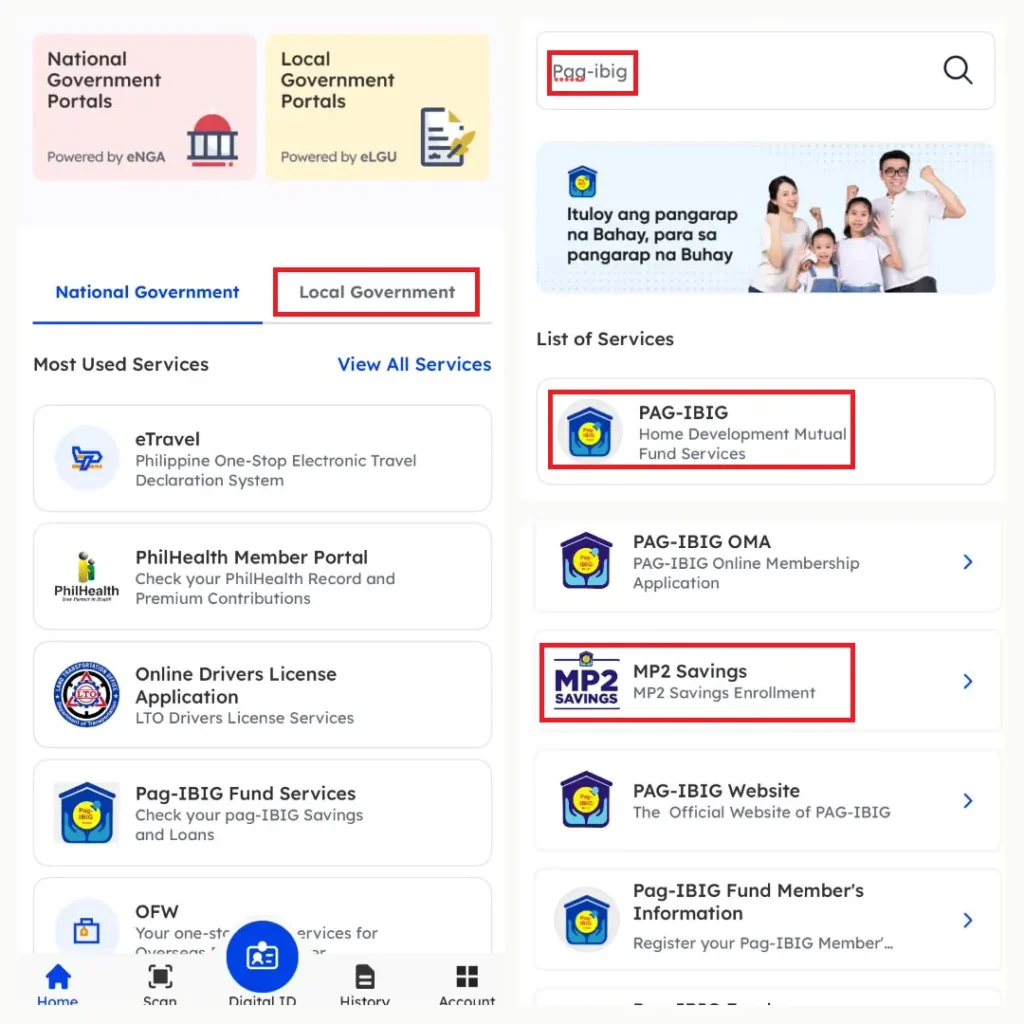
- Open the eGovPH app.
- Log in to your account.
- Select View All Services.
- Go to By Agencies.
- Search for Pag-IBIG.
- Open the Pag-IBIG services.
- Look for MP2 Savings.
- Select it to view your available MP2 information.
This can be useful if you already have an eGovPH account and don’t want to switch between several government apps.
However, if you need the most detailed MP2 information, Virtual Pag-IBIG is still a useful place to start.
Which Method Is Best for Checking Your MP2 Balance?
All three methods can be useful, but they serve slightly different purposes.
| Method | Best For | Convenience |
|---|---|---|
| Virtual Pag-IBIG Website | Detailed MP2 account information | ⭐⭐⭐⭐ |
| Virtual Pag-IBIG App | Quick balance and dividend checks | ⭐⭐⭐⭐⭐ |
| eGovPH App | Accessing Pag-IBIG alongside other government services | ⭐⭐⭐⭐ |
Choose the Virtual Pag-IBIG website if:
You want to see details such as:
- Initial Remittance Date
- Last Remittance Date
- Total No. of Contributions
- Total Contribution
- Total Dividends
- Total Savings
Choose the Virtual Pag-IBIG app if:
You mainly want to monitor your account from your phone.
The official app is designed to let members view their records and monitor MP2 growth and dividends.
Choose eGovPH if:
You already use the app for other government services and want to access your Pag-IBIG information from the same platform.
How Often Should You Check Your MP2 Savings?
You don’t need to check your MP2 account every day.
MP2 is intended as a longer-term savings program, so checking your balance too frequently won’t necessarily improve your returns.
A practical schedule could be:
After making a contribution
Check after enough time has passed for the payment to be posted.
Every few months
Review your total contributions and savings to make sure your records look correct.
After dividends are credited
Check how much dividend income has been added to your account.
Before your MP2 maturity date
Review your account and make sure you understand your options for receiving or reinvesting your savings.
Regular monitoring is especially useful if you contribute through different payment channels.
For example, if you fund your MP2 through GCash, keeping your payment confirmations can make it easier to reconcile your personal records with your Pag-IBIG account. You can learn more in our guide on how to pay Pag-IBIG MP2 using GCash.
What If Your MP2 Contribution Is Not Showing Online?
One of the most common concerns after making an MP2 payment is:
“I already paid. Why can’t I see it in my MP2 account?”
Don’t immediately assume that your payment failed.
First, check your payment confirmation or receipt.
Then consider whether the payment has had enough time to be processed and reflected in your Pag-IBIG record.
Try these steps:
- Check your payment receipt.
- Confirm that you used the correct MP2 account number.
- Wait for the payment to be posted.
- Log out and log back in to Virtual Pag-IBIG.
- Try checking through the website if you initially used the app.
- Check again later if the payment was made recently.
If the payment still does not appear after a reasonable processing period, keep your receipt and transaction reference available when contacting Pag-IBIG Fund.
This is another reason why it is useful to save your payment confirmations instead of relying entirely on your online balance.
What If Your MP2 Dividends Are Not Showing?
Dividends are another area where members can sometimes get confused.
Your MP2 balance does not necessarily increase every time you make a contribution because contributions and dividends are separate components of your account.
You can look at your Total Contribution and Total Dividends separately to understand how much came from your deposits and how much represents credited earnings.
The Virtual Pag-IBIG app specifically supports monitoring annual dividends from MP2 Savings.
If you’re trying to understand how annual payout differs from leaving dividends in the account to compound, our guide on annual payout vs. compounded Pag-IBIG MP2 savings can help.
How to Track Your MP2 Growth Over Time
Checking your current balance is useful, but tracking your growth over time can give you a better understanding of your savings strategy.
You can create a simple tracker like this:
| Date | Total Contribution | Total Dividends | Total Savings |
|---|---|---|---|
| January | ₱50,000 | ₱0 | ₱50,000 |
| April | ₱70,000 | ₱0 | ₱70,000 |
| July | ₱90,000 | ₱0 | ₱90,000 |
| December | ₱100,000 | ₱7,000 | ₱107,000 |
The numbers above are only an example.
The idea is to record your actual MP2 figures periodically so you can see how your account changes.
This can also help you evaluate whether your contribution strategy matches your goals.
For example, some savers prefer a large lump-sum contribution, while others prefer to contribute monthly. If you’re comparing the two approaches, read Lump Sum vs. Monthly: Which Pag-IBIG MP2 Strategy Wins?.
Does Checking Your MP2 Balance Affect Your Dividends?
No.
Simply viewing your MP2 account does not change your savings or dividends.
You can log in and check your balance whenever you want.
What affects your eventual MP2 earnings is your savings activity and the dividends credited by Pag-IBIG Fund, not how frequently you open the app or website.
That said, checking your account occasionally can help you stay aware of your progress and spot potential discrepancies sooner.
Can OFWs Check Their MP2 Savings Online?
Yes.
Online access is particularly useful for OFWs because they may not be physically present in the Philippines when they want to monitor their MP2 savings.
Instead of visiting a Pag-IBIG branch, an OFW can use Virtual Pag-IBIG or the mobile app to monitor their account remotely.
The Virtual Pag-IBIG app is designed to provide access to Pag-IBIG records from a mobile device, including MP2 savings and dividends.
If you’re an OFW managing your MP2 account from abroad, our Complete Pag-IBIG MP2 Guide for OFWs covers the broader process of opening, funding, managing, and eventually claiming your savings.
What Should You Do After Checking Your MP2 Balance?
Once you know your balance, you can use the information to make better decisions about your savings.
For example, ask yourself:
Am I contributing enough for my goal?
If your target is ₱500,000 after five years, compare your current contributions and projected dividends with your target.
A calculator can make this easier.
You can use the Pag-IBIG MP2 Savings Calculator to estimate potential growth based on your starting amount, monthly contribution, dividend rate, and investment period.
Should I continue contributing?
Checking your Total Contribution alongside Total Savings can help you determine how much you have already accumulated.
If you are still within your five-year MP2 term, you can continue building the account according to your savings strategy.
Should I open another MP2 account?
Some savers use multiple MP2 accounts with different maturity dates rather than putting all their savings into a single account.
This is where an MP2 ladder strategy may become useful.
Should I reinvest after maturity?
If an MP2 account is approaching maturity, you may need to decide whether to use the proceeds for your financial goals or reinvest them into another savings vehicle.
If you’re considering rolling the money into another MP2 account, see What Is a Pag-IBIG MP2 Rollover?.
Checking Your MP2 Balance Is Different From Checking Your Investment Strategy
Your online MP2 balance tells you what you have, but it doesn’t necessarily tell you whether your overall savings strategy is right for you.
For example, seeing ₱300,000 in Total Savings is useful, but you might still want to ask:
- How much of that came from my contributions?
- How much came from dividends?
- When will the account mature?
- Do I need the money soon?
- Should I open another MP2 account?
- Does MP2 still fit my financial goals?
- Should some of my savings be kept in more liquid accounts?
MP2 can be one part of a broader savings strategy.
For example, if you’re deciding between MP2 and other savings options, you may want to compare it with digital banks in terms of accessibility, rates, liquidity, and account structure. Our guide on Pag-IBIG MP2 vs. Digital Banks goes deeper into that comparison.
Likewise, if your goal is retirement, you can compare MP2 with other retirement-focused options through our guides on MP2 vs. SSS Pension Booster and MP2 vs. PERA for retirement savings.
What to Remember When Viewing Your MP2 Account
Before you finish checking your account, look at these six figures or details:
1. Initial Remittance Date
This tells you when your first MP2 remittance was recorded.
2. Last Remittance Date
This shows the most recent remittance reflected in your account.
3. Total No. of Contributions
This tells you how many contributions are recorded.
4. Total Contribution
This is the cumulative amount you have deposited.
5. Total Dividends
This shows the dividends credited to your MP2 account.
6. Total Savings
This gives you the overall accumulated value shown for your MP2 account.
Together, these figures provide a much clearer picture than simply checking how much you have deposited.
Frequently Asked Questions About Checking MP2 Savings Online
Can I check my Pag-IBIG MP2 balance online?
Yes. You can view your MP2 savings through Virtual Pag-IBIG, the Virtual Pag-IBIG mobile app, and the eGovPH app.
The official Virtual Pag-IBIG app supports viewing MP2 savings growth and monitoring annual dividends.
Where can I see my total MP2 contributions?
Log in to Virtual Pag-IBIG, select MP2 Savings, and click View. Your account information includes the Total Contribution.
Where can I see my MP2 dividends?
Your MP2 account record shows your Total Dividends. You can also monitor annual MP2 dividends through the Virtual Pag-IBIG mobile app.
Can I check MP2 using my phone?
Yes. You can use the official Virtual Pag-IBIG mobile app or access Pag-IBIG services through eGovPH.
Can I check MP2 if I am abroad?
Yes. Online access is particularly convenient for members who are outside the Philippines because you can monitor your savings remotely without visiting a Pag-IBIG branch.
Why is my latest MP2 payment not showing?
A recent payment may not have been posted to your Pag-IBIG account yet. Keep your payment confirmation and check again after the transaction has had time to process.
If it remains missing, contact Pag-IBIG Fund and provide your payment details.
Is Total Contribution the same as Total Savings?
No.
Total Contribution represents the money you have contributed, while Total Savings reflects the accumulated amount shown in your MP2 record, including credited dividends.
Can I check multiple MP2 accounts?
If you have multiple MP2 accounts, check the account details carefully so you do not accidentally combine the contribution history or maturity timelines of different accounts.
Final Thoughts
Checking your Pag-IBIG MP2 savings balance does not have to be complicated.
For the most detailed view, log in to Virtual Pag-IBIG, select MP2 Savings, and click View. You can then review your initial remittance date, latest remittance date, number of contributions, total contributions, dividends, and total savings.
If you simply want a quick update from your phone, the Virtual Pag-IBIG app is a convenient alternative. The official app is specifically designed to let members view their Pag-IBIG records, monitor MP2 growth, and track annual dividends.
You can also use eGovPH to access Pag-IBIG services, including MP2 Savings.
The most important thing is not to obsess over your balance every day. Instead, check your account periodically, make sure your payments are being reflected, monitor the dividends being credited, and use the information to assess whether your savings strategy is still aligned with your goals.
Once you know exactly how much you have saved, you can make better decisions about your next contribution, whether to continue saving, whether to build an MP2 ladder, and what to do when your account reaches maturity.
Related Articles
If you want to learn more about managing your MP2 savings, these guides may also help: