


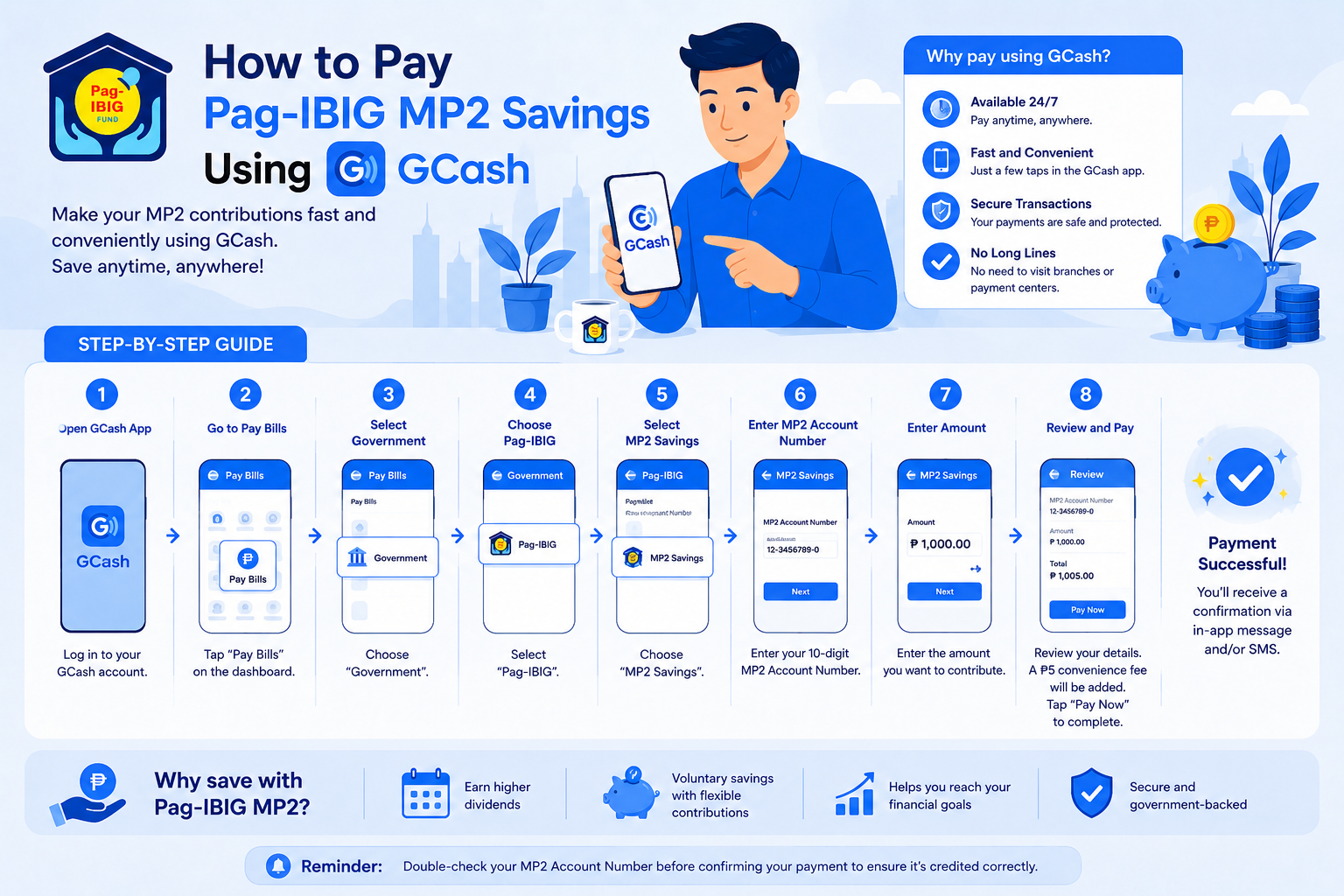
GCash is one of the easiest and most convenient ways to pay your Pag-IBIG MP2 contributions. Instead of visiting a branch or payment centre, you can deposit money into your MP2 Savings account anytime using your mobile phone, making it ideal for members who want to save regularly without leaving home.
Whether you’re making your first MP2 contribution or adding to your existing savings, paying through GCash only takes a few minutes. Once your payment is successfully processed, your contribution will be credited to your MP2 account after the standard processing period.
This guide walks you through the complete process of paying your Pag-IBIG MP2 using GCash, including the requirements, step-by-step instructions, expected posting times, common payment mistakes to avoid, and how to verify that your contribution has been successfully credited.
Quick Answer: Yes, you can pay or deposit money into your Pag-IBIG MP2 Savings account using the GCash app. Simply open GCash, go to Bills > Government > Pag-IBIG Fund, select MP2 Savings, enter your 12-digit MP2 Account Number, contribution amount, and coverage period, then complete your payment. Most MP2 contributions are credited within 1 to 3 business days, although processing times may vary during weekends, public holidays, or system maintenance.
What You’ll Need Before Paying Your Pag-IBIG MP2 Using GCash
Before making your MP2 contribution through GCash, it’s worth taking a minute to prepare the information you’ll need. Having everything ready beforehand can help you complete the payment smoothly and avoid delays caused by incorrect details.
1. An Active Pag-IBIG MP2 Savings Account
You’ll need an active Pag-IBIG MP2 Savings account before you can make a contribution. If you haven’t opened one yet, you’ll first need to apply for an MP2 account and wait until you receive your 12-digit MP2 Account Number.
Tip: If you’ve only recently opened your MP2 account, allow some time for it to become available in Pag-IBIG’s system before making your first contribution.
2. Your 12-Digit MP2 Account Number
Your MP2 Account Number is required to ensure your payment is credited to the correct savings account. This is different from your Pag-IBIG Membership ID (MID) Number, so double-check that you’re using the correct number before submitting your payment.
If you have more than one MP2 account, verify that you’ve entered the account number for the specific savings account you want to fund.
3. A Verified GCash Account
You’ll need a verified GCash account with enough available balance to cover your MP2 contribution and any applicable convenience fee. Make sure your GCash app is updated to the latest version before starting your payment.
4. A Stable Internet Connection
Since you’ll complete the transaction online and scan a QR code using the GCash app, it’s best to use a stable internet connection to avoid interruptions during the payment process.
5. Decide How Much You Want to Contribute
One of the biggest advantages of the Pag-IBIG MP2 Savings Programme is its flexibility. You decide how much and how often you’d like to save.
You can:
- Make the minimum contribution of ₱500
- Deposit different amounts whenever you contribute
- Make multiple MP2 contributions within the same month
- Contribute monthly or whenever your budget allows
There is no maximum contribution limit, making MP2 suitable whether you’re saving a few hundred pesos or making larger deposits over time.
Before You Proceed
Before you complete your payment, quickly confirm the following:
- ✓ You’re using your 12-digit MP2 Account Number, not your MID Number.
- ✓ Your GCash account has enough balance.
- ✓ The contribution amount is correct.
- ✓ You’ll save the payment confirmation or transaction reference after your payment is successful.
Taking a few moments to review these details can help ensure your MP2 contribution is processed without unnecessary delays.
How to Pay Pag-IBIG MP2 Using GCash
Step 1: Open the GCash App
Step 2: Tap Bills
Step 3: Select Government
Step 4: Choose MP2 Savings
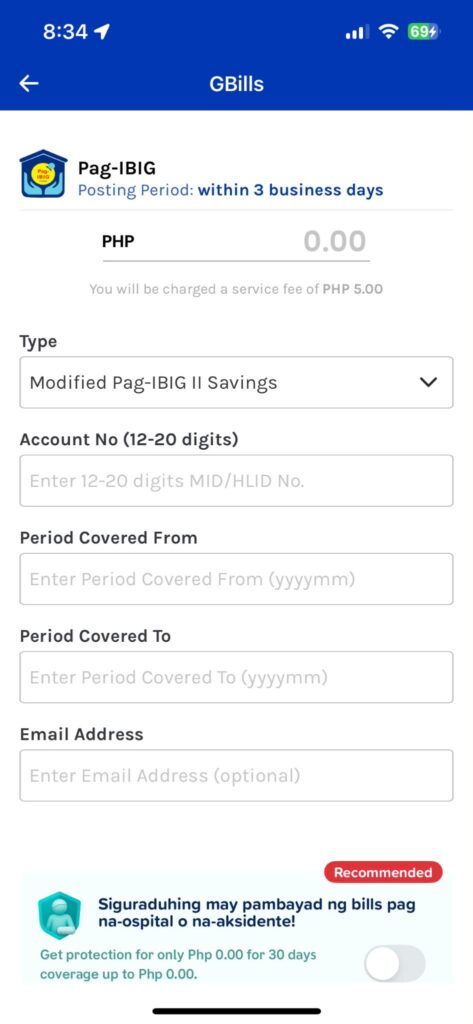
Step 5: Enter Your MP2 Account Number
Step 6: Enter Your Contribution Amount
Step 7: Select the Coverage Period
Step 8: Review Your Payment Details
Carefully review all the information before confirming your payment, including:
- Biller: Pag-IBIG Fund
- Payment type: MP2 Savings
- MP2 Account Number
- Contribution amount
- Coverage period
If everything is correct, tap Pay to complete your transaction.
Step 9: Save Your Receipt
Once your payment is successful, GCash will display a confirmation screen along with your transaction reference number. Save a screenshot or keep your digital receipt until your contribution has been successfully credited to your MP2 Savings account.
How Long Does It Take for Pag-IBIG MP2 Payments Made Through GCash to Reflect?
After completing your payment, your MP2 contribution won’t usually appear in your account immediately. In most cases, contributions made through GCash are credited within 1 to 3 business days, although processing times may vary depending on the payment provider, weekends, public holidays, or system maintenance.
If your contribution doesn’t appear right away, there’s usually no need to worry. Allow the standard processing time before following up with Pag-IBIG.
Factors That May Affect Posting Time
Your MP2 contribution may take longer to reflect if:
- You made your payment on a weekend or public holiday.
- There is scheduled system maintenance by GCash or Pag-IBIG.
- Your payment is still being processed by the payment provider.
- Incorrect payment details require additional verification.
How to Check if Your MP2 Contribution Has Been Credited
Once the expected processing period has passed, you can verify whether your contribution has been posted by:
- Logging in to your Virtual Pag-IBIG account.
- Viewing your MP2 Savings account details.
- Checking your transaction or contribution history for the latest payment.
If your contribution hasn’t been credited after several business days, keep your GCash transaction receipt or reference number and contact Pag-IBIG Fund for assistance. Having your payment details ready will help their support team locate your transaction more quickly.
Can You Automate Your Pag-IBIG MP2 Savings Using GCash?
If you’re planning to contribute to your Pag-IBIG MP2 Savings account regularly, you might be wondering whether GCash allows you to automate your payments.
At the moment, GCash doesn’t offer automatic or recurring payments specifically for Pag-IBIG MP2 contributions. You’ll need to manually make a payment each time you want to contribute.
However, there are a few ways to make future contributions quicker and stay consistent with your savings goals:
- Save Pag-IBIG Fund as a biller in GCash. This lets you reuse your saved payment details for future contributions, so you won’t need to enter your MP2 Account Number each time.
- Set a monthly reminder on your phone or calendar to make your MP2 contribution.
- Contribute after payday to build a consistent saving habit.
- Adjust your contribution amount whenever needed. Since MP2 is a voluntary savings programme, you can increase, decrease, or even skip contributions depending on your financial situation.
While MP2 doesn’t require fixed monthly deposits, contributing consistently can help you grow your savings over the account’s five-year term.
Common GCash MP2 Payment Issues and How to Fix Them
Most Pag-IBIG MP2 payments made through GCash are processed without any issues. However, if you encounter a problem, the tips below can help you resolve the most common payment concerns.
Your Contribution Hasn’t Been Credited Yet
MP2 contributions made through GCash are typically posted within 1 to 3 business days. If your payment hasn’t reflected yet:
- Wait until the standard processing period has passed.
- Consider whether your payment was made on a weekend or public holiday.
- Check your MP2 contribution history through your Virtual Pag-IBIG account.
- Keep your GCash transaction receipt or reference number until your contribution has been credited.
If your payment still hasn’t appeared after several business days, contact Pag-IBIG Fund and provide your transaction details for assistance.
You Entered the Wrong MP2 Account Number
If you realise you’ve entered an incorrect MP2 Account Number, contact Pag-IBIG Fund as soon as possible. The earlier you report the issue, the easier it may be for them to investigate your payment.
Always review your payment details carefully before confirming your transaction.
Your GCash Payment Failed
If your payment wasn’t successful:
- Check that your GCash wallet has sufficient balance.
- Make sure you have a stable internet connection.
- Close and reopen the GCash app before trying again.
- Check the GCash app or official channels for any ongoing system maintenance.
If your account has been charged but you didn’t receive a successful payment confirmation, avoid making another payment immediately. Instead, wait for the transaction to be processed or contact GCash Support if the issue persists.
You Didn’t Save Your Receipt
If you forgot to take a screenshot of your payment confirmation, you can usually find your transaction details in your GCash transaction history. It’s still a good idea to save a copy until your MP2 contribution has been successfully posted.
Frequently Asked Questions About Paying Pag-IBIG MP2 Using GCash
Can I pay my Pag-IBIG MP2 contributions using GCash?
Yes. GCash is one of the available payment channels for Pag-IBIG MP2 contributions. You can conveniently make payments through the GCash app without visiting a Pag-IBIG branch or payment centre.
What is the minimum MP2 contribution when paying through GCash?
The minimum MP2 contribution is ₱500 per transaction. You can contribute any amount above the minimum, and there is no maximum contribution limit.
How long does it take for my MP2 contribution to reflect?
In most cases, contributions made through GCash are credited within 1 to 3 business days. Processing may take longer during weekends, public holidays, or if either GCash or Pag-IBIG is undergoing system maintenance.
Can I make multiple MP2 contributions using GCash?
Yes. You can make multiple contributions to the same MP2 account, even within the same month. Since MP2 is a voluntary savings programme, you’re free to contribute whenever your budget allows.
Can I pay someone else’s Pag-IBIG MP2 account using GCash?
Yes, as long as you enter the correct 12-digit MP2 Account Number for the account you wish to fund. Before confirming your payment, carefully verify all the details to ensure the contribution is credited to the intended MP2 account.
Is there a convenience fee when paying MP2 through GCash?
Yes. GCash charges a ₱5 convenience fee for each Pag-IBIG MP2 payment. The fee is displayed on the payment confirmation screen before you complete your transaction, so you’ll see the total amount you’ll be charged before confirming the payment.
What should I do if I entered the wrong MP2 Account Number?
If you entered the wrong MP2 Account Number, contact Pag-IBIG Fund as soon as possible and provide your GCash transaction reference number. They can advise you on the next steps and determine whether your payment can be traced or corrected.
Planning Your MP2 Contributions?
Now that you know how to pay your Pag-IBIG MP2 contributions using GCash, the next step is deciding how much you’d like to save. Since MP2 is a flexible savings programme, you can contribute the minimum amount or increase your deposits whenever your budget allows.
If you’re unsure how much to contribute, our Pag-IBIG MP2 Savings Calculator can help you estimate how your savings may grow based on your contribution amount, expected dividend rate, and investment period. It’s a simple way to compare different scenarios and plan your MP2 savings with more confidence.
Conclusion
Paying your Pag-IBIG MP2 contributions through GCash is a simple and convenient way to grow your savings without visiting a branch or payment centre. As long as you have your MP2 Account Number and a verified GCash account, you can make contributions anytime, wherever you are.
Before confirming each payment, remember to review your MP2 Account Number, contribution amount, and coverage period to help ensure your payment is credited correctly. By contributing consistently, you can make the most of your Pag-IBIG MP2 Savings account and work towards your long-term financial goals.