


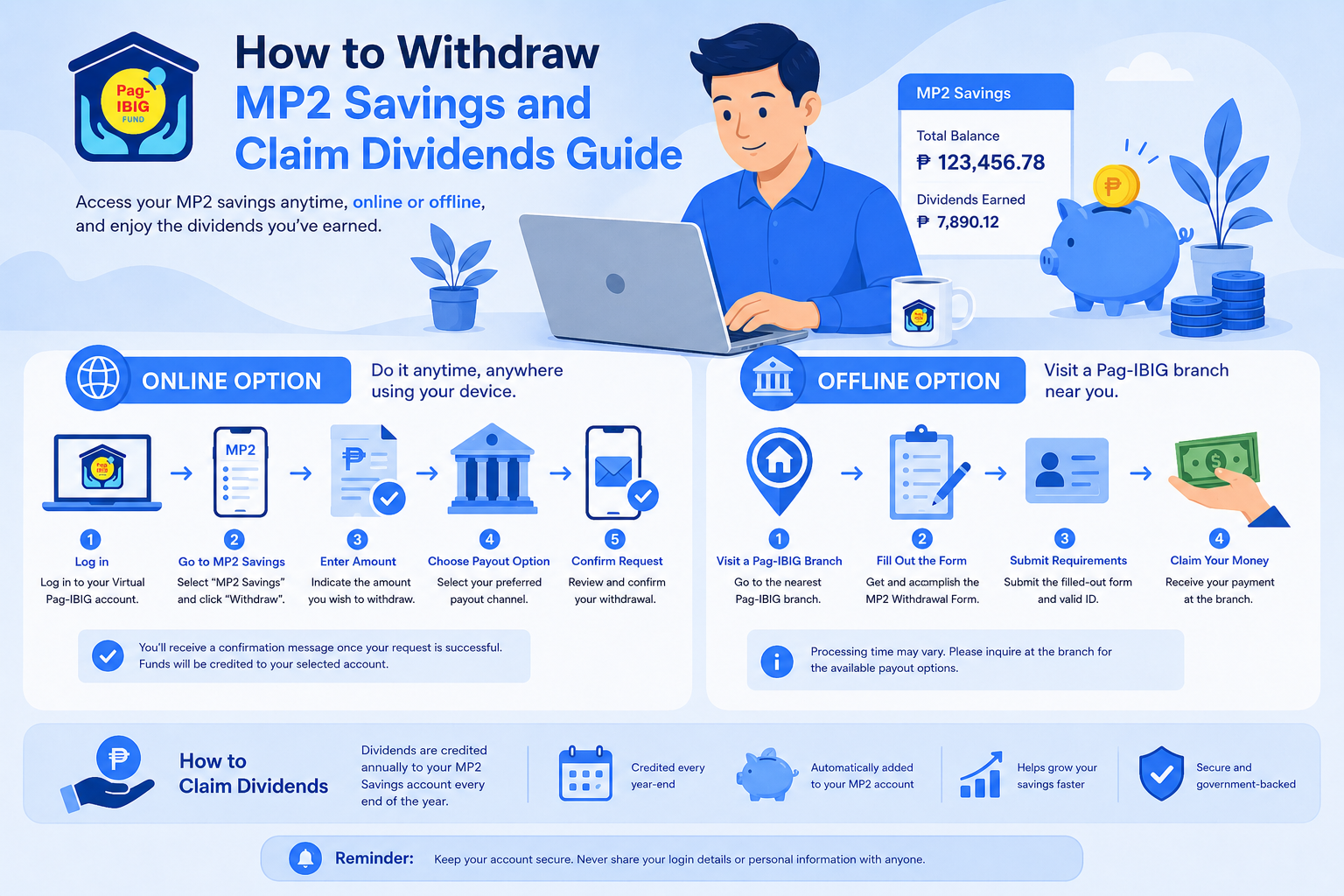
The Pag-IBIG Fund MP2 Savings Program has become one of the most popular savings options for Filipinos who want to grow their money through higher annual dividends while keeping their funds in a government-backed savings program. Because of its relatively strong dividend performance over the years, many members use MP2 for medium-term financial goals such as emergency funds, home savings, retirement preparation, travel funds, or education expenses.
Eventually, most members reach the point where they need to withdraw their savings. Some are claiming a matured account after the full five-year term, while others may need early withdrawal because of retirement, medical emergencies, migration, unemployment, or other qualified reasons. Many members also want to know whether it is possible to process the withdrawal online instead of visiting a branch personally.
The good news is that Pag-IBIG now offers online savings claim options for eligible members. However, requirements, processing times, and payout methods can vary depending on your situation. Missing documents or incorrect information can also delay your claim, so understanding the actual process before filing can save you time and frustration.
This guide covers everything you need to know about MP2 withdrawal, including how to withdraw online, how to claim through a branch, the requirements you need to prepare, valid reasons for early withdrawal, estimated processing times, dividend payouts, and practical tips to avoid delays.
Understanding How MP2 Withdrawal Works
The MP2 Savings Program is designed as a voluntary five-year savings program for active Pag-IBIG members. During the five-year term, your savings earn annual dividends declared by Pag-IBIG.
Once the account reaches maturity, members can claim:
- Total MP2 contributions
- Earned dividends
- Remaining account balance
Members who selected annual dividend payouts receive dividends yearly, while those who selected compounded dividends receive the full amount, including accumulated earnings, upon maturity.
In most cases, withdrawing matured MP2 savings is more straightforward compared to early withdrawal applications because the account has already completed its required term.
When Can You Withdraw MP2 Savings?
There are two main situations where members can withdraw MP2 savings:
| Withdrawal Type | Description |
|---|---|
| Matured Withdrawal | Withdrawal after the 5-year maturity period |
| Early Withdrawal | Withdrawal before maturity due to approved reasons |
The requirements and dividend computation may differ depending on which category your claim falls under.
MP2 Withdrawal After 5 Years
The standard maturity period for an MP2 account is five years from the account’s first contribution date.
For example:
- If your first MP2 contribution was posted in July 2021
- Your account will typically mature in July 2026
Upon maturity, members may:
- Withdraw the full amount
- Reinvest the funds into a new MP2 account
- Continue saving through another MP2 enrollment
Many members choose to re-enroll after maturity because of the competitive dividend rates offered by Pag-IBIG over the years.
If you want to estimate how much your savings could grow over time, you can use this Pag-IBIG MP2 Savings Calculator to project your possible dividends and maturity value.
How to Withdraw MP2 Savings Online
One of the biggest advantages today is that eligible members may process their MP2 claims online through the Virtual Pag-IBIG platform.
This option is especially convenient for:
- OFWs
- Members living far from branches
- Busy employees
- Senior citizens
- Members with complete digital documents
The online process reduces the need for multiple branch visits, although some cases may still require additional verification.
You can start your application through the official Virtual Pag-IBIG Claim Savings Portal.
Step-by-Step Guide to Online MP2 Withdrawal
1. Prepare Your Documents First
Before starting the online application, make sure you already have digital copies of your documents.
Common requirements include:
- Valid government-issued ID
- Pag-IBIG MID number
- Active mobile number
- Email address
- Proof of bank account, if applicable
- Supporting documents for special claims
Your uploaded documents should be clear and readable. Blurry photos are one of the common reasons for verification delays.
2. Access the Virtual Pag-IBIG Claim Portal
Open the official savings claim page and select the option for claiming your savings.
The portal may ask for:
- Full name
- Date of birth
- MID number
- Registered contact information
The system will verify your membership records before allowing you to continue.
3. Upload Supporting Requirements
Upload all required files in the correct format.
Common accepted formats include:
- JPG
- PNG
Avoid cropped images or screenshots with incomplete details.
4. Choose Your Preferred Release Method
Your MP2 savings may be released through:
- Loyalty Card Plus
- Bank transfer
- Check issuance
Members without a Loyalty Card Plus may still receive their claims through check issuance or bank transfer, depending on eligibility and branch policies.
5. Submit Your Application
Review your information carefully before final submission.
After submission, you should receive a confirmation email or reference number that you can use for monitoring your claim.
Keep screenshots or copies of your submitted documents for reference.
How to Withdraw MP2 Savings Through a Branch
Although online withdrawal is more convenient for many members, branch applications are still common.
Some members prefer branch filing because:
- They want direct assistance
- Their records need correction
- Their online claim was rejected
- They need to submit original documents
- Their claim involves special circumstances
Branch applications may also help avoid delays caused by incomplete online uploads.
Step-by-Step Guide to Branch Withdrawal
1. Visit a Pag-IBIG Branch
Bring both the original and photocopies of your documents.
It is best to visit earlier in the day to avoid long lines, especially in busy branches.
2. Request a Savings Claim Form
Inform the staff that you are applying for MP2 withdrawal.
You will be asked to complete an Application for Provident Benefits Claim (APB) form.
3. Submit Your Documents
The branch personnel will validate:
- Your identity
- Membership details
- MP2 account status
- Supporting documents
If there are discrepancies in your records, you may be asked to submit additional proof or correction requests.
4. Wait for Claim Processing
After submission, your application will undergo evaluation and approval.
Once approved, the funds will be released through your chosen payout method.
Requirements to Withdraw MP2 Savings
The exact requirements may vary depending on your withdrawal reason, but these are the most common documents requested by Pag-IBIG.
| Requirement | Purpose |
|---|---|
| Valid government-issued ID | Identity verification |
| Pag-IBIG MID number | Account verification |
| Claim application form | Withdrawal request |
| Proof of bank account | Fund disbursement |
| Supporting documents | Special claims or early withdrawal |
Accepted Valid IDs for MP2 Withdrawal
Pag-IBIG commonly accepts the following IDs:
- Passport
- UMID
- Driver’s license
- PhilSys National ID
- PRC ID
- Postal ID
- Voter’s ID
Your ID must be:
- Clear and readable
- Not expired
- Consistent with your registered Pag-IBIG records
Differences in name spelling or birth date can delay processing.
How to Claim MP2 Without a Loyalty Card
A common misconception is that a Loyalty Card Plus is required for MP2 withdrawal.
While having one can make fund release faster and more convenient, it is not always mandatory.
Members without a Loyalty Card may still receive their funds through:
- Check issuance
- Bank transfer
- Alternative disbursement methods approved by Pag-IBIG
In many real-world claims shared by members, checks are still commonly issued for applicants without Loyalty Cards.
However, many members still choose to get a Loyalty Card Plus because it can simplify future transactions and dividend payouts.
How to Withdraw MP2 Savings Before Maturity
Although MP2 is intended as a five-year savings program, Pag-IBIG allows early withdrawal under approved circumstances.
This is commonly referred to as MP2 pre-termination.
Early withdrawal rules are important because the release amount and dividend entitlement may differ from regular maturity claims.
Valid Reasons for Early MP2 Withdrawal
Based on publicly available Pag-IBIG guidance and member references, early withdrawal may be allowed for the following reasons:
- Retirement
- Permanent total disability or insanity
- Separation from employment due to health reasons
- Critical illness of the member or an immediate family member
- Death of a member or an immediate family member
- Permanent departure from the Philippines
- Unemployment due to company closure or layoff
- OFW repatriation
- Other meritorious grounds approved by Pag-IBIG
These situations usually require supporting documents for approval.
Verified Requirements for Early MP2 Withdrawal
The required documents depend on the reason for withdrawal.
Below are examples commonly required for each type of claim.
| Situation | Common Supporting Documents |
|---|---|
| Retirement | Retirement certificate or proof of retirement |
| Total disability | Medical certificate from licensed physician |
| Critical illness | Medical records and physician certification |
| Permanent migration | Visa or immigration documents |
| Death claim | Death certificate and proof of relationship |
| Unemployment due to layoff | Certificate of termination or company closure |
Medical-related claims may require additional certifications and verification.
Because requirements may change depending on Pag-IBIG policies, members are still encouraged to verify updated documentary requirements directly with their branch before filing.
What Happens to Your Dividends During Early Withdrawal?
Dividend entitlement depends on the reason for early withdrawal and the dividend option you originally selected.
For approved early withdrawal cases under valid grounds, members may still receive earned dividends.
However, voluntary pre-termination without qualified reasons may reduce dividend entitlement.
According to publicly discussed MP2 withdrawal guidelines:
For compounded dividend accounts:
- Members may receive the principal savings
- 50% of accumulated dividends from prior years
- 50% of current year dividends after declaration
For annual dividend payout accounts:
- Previously released dividends may partially affect the final computation
Because dividend treatment can vary depending on the account setup and reason for withdrawal, members should confirm their estimated release amount before proceeding with pre-termination.
How to Claim MP2 Dividends
MP2 members may choose between two dividend payout options during account enrollment:
| Dividend Option | How It Works |
|---|---|
| Annual Payout | Dividends released yearly |
| Compounded Savings | Dividends stay in the account until maturity |
If you selected annual dividend payout, your dividends are typically credited yearly through your preferred disbursement method.
If you selected compounded dividends, your earnings remain invested and continue earning additional dividends over time.
Many members choose compounded dividends because this setup maximizes long-term growth over the full five-year term.
Actual MP2 Withdrawal Processing Time
Processing time is one of the most searched topics among MP2 members because waiting periods can vary depending on the branch, payout method, and document verification process.
Based on member experiences and publicly available references, MP2 withdrawal processing commonly takes around:
| Withdrawal Type | Estimated Processing Time |
|---|---|
| Online claim | Around 10 to 20 working days |
| Branch claim | Around 10 to 20 working days |
| Claims with incomplete requirements | Longer than 20 working days |
Some members reported receiving funds within 5 to 10 business days, while others experienced delays beyond 20 working days, depending on branch workload and verification requirements.
In many branch applications, claim stubs reportedly indicate a processing timeline of approximately 20 working days.
Factors That Can Delay Your MP2 Claim
Several issues can slow down the processing of your withdrawal.
Incorrect Personal Information
Even small differences in:
- Name spelling
- Birth date
- MID number
can trigger additional verification.
Incomplete Documents
Missing signatures, blurry uploads, or expired IDs are common reasons for delayed claims.
Bank Verification Issues
The bank account name should match the registered member’s name.
Incorrect account numbers may also delay disbursement.
Branch Volume and Workload
Some branches process claims faster than others, depending on transaction volume.
This is why actual timelines may vary even if applications are filed on the same date.
Tips for Faster MP2 Withdrawal Processing
To help avoid unnecessary delays:
- Double-check all information before submission
- Ensure uploaded documents are clear
- Use updated contact details
- Keep copies of your application reference number
- Monitor your email and SMS notifications regularly
- Follow up with the branch if processing exceeds the estimated timeline
Many members also recommend applying for a Loyalty Card Plus before maturity to simplify future withdrawals and dividend releases.
Online vs Branch Withdrawal: Which Is Better?
Here is a practical comparison between the two methods.
| Feature | Online Withdrawal | Branch Withdrawal |
|---|---|---|
| Convenience | High | Moderate |
| Travel Required | No | Yes |
| Best for OFWs | Yes | Sometimes |
| Assistance from staff | Limited | Available |
| Ideal for simple matured claims | Yes | Yes |
| Better for complicated cases | Sometimes | Yes |
Online filing works well for straightforward matured claims with complete documents, while branch filing is usually better for cases involving corrections, special claims, or missing records.
Frequently Asked Questions
Can I withdraw my MP2 savings immediately after maturity?
Yes. Once your MP2 account completes the five-year maturity period, you may apply for withdrawal. The maturity is usually counted from the date of your first contribution, not necessarily the account creation date. Some members choose to file immediately after maturity, while others wait a little longer for the account status to fully update in the system.
Can I process my MP2 withdrawal completely online?
Yes, many members can now process their MP2 claims online through the Virtual Pag-IBIG portal. However, some applications may still require additional verification or branch visits if records are incomplete or documents cannot be validated online. Members with straightforward matured claims and complete documents generally experience a smoother online process.
Can I claim MP2 savings without a Loyalty Card?
Yes. Although the Loyalty Card Plus is one of the most convenient payout methods, it is not always required for MP2 withdrawal. Some members still receive their proceeds through check issuance or bank transfer. However, processing may vary depending on the branch and the payout option selected during application.
Is there a penalty for withdrawing before maturity?
There may be an impact on your dividend earnings if you withdraw your MP2 savings before the five-year maturity period without qualified grounds. In some cases, only partial dividends may be released. The exact computation depends on your dividend option and the reason for pre-termination.
Can I open another MP2 account after withdrawing?
Yes. Eligible Pag-IBIG members may still open another MP2 account even after withdrawing or pre-terminating a previous one, provided they remain active Pag-IBIG members. Many investors actually open multiple MP2 accounts over time as part of their savings strategy.
If you are planning to start another account after withdrawal, you can read our guide on how to open a Pag-IBIG MP2 savings account.
Continuing Your MP2 Savings Journey
Many members continue investing in MP2 even after their first account matures because of its historically competitive dividend rates and relatively flexible contribution options.
You can contribute through:
- Online banking
- E-wallet apps
- Salary deduction
- Over-the-counter payment centers
If you plan to continue saving after withdrawing your current MP2 account, this guide on how to pay Pag-IBIG MP2 online and over the counter explains the available payment methods in detail.
Final Thoughts
Withdrawing your MP2 savings can be a relatively smooth process when you understand the correct procedures, prepare complete documents, and choose the right withdrawal method for your situation. Whether you are claiming a matured account after five years or applying for early withdrawal due to approved circumstances, knowing the actual requirements and timelines can help you avoid unnecessary delays.
Online filing has made MP2 claims more accessible for many members, especially OFWs and busy employees who prefer remote processing. At the same time, branch applications remain useful for members with special cases, incomplete records, or claims that require additional verification.
Most importantly, before withdrawing your savings, it helps to evaluate your long-term financial goals. Some members choose to withdraw and use the funds immediately, while others reinvest into a new MP2 account to continue growing their savings through compounded dividends. Understanding how MP2 withdrawal works allows you to make a more informed financial decision based on your needs and future plans.