



When someone searches on Google, the first thing they see is not your website—it’s your snippet. That small block of text showing your title, description, and URL is what helps users decide whether to click. A Google SERP preview lets you see exactly how that snippet appears before your page goes live, allowing you to fine-tune how your site looks in search results.
Previewing your snippet might seem minor, but it can have a major impact on visibility, click-through rates, and overall SEO performance.
Understanding What a Google SERP Preview Is
A Google SERP preview is a visual representation of how your page might appear in search results. It simulates what users see when your site appears on a Google results page. The preview typically includes three main parts:
- Title tag (the clickable headline of the result)
- Meta description (the short text under the title)
- URL or breadcrumb (the link path showing where the page belongs on your site)
Some pages may also show additional elements such as ratings, images, or publication dates. These are called rich results or enhancements, and they can make your listing stand out even more.
A SERP preview helps you understand whether your title fits within Google’s width limit, whether your description makes sense in context, and how your link looks next to competitors. It’s a simple yet valuable way to see your page through a searcher’s eyes.
Why SERP Previews Matter for SEO
The snippet displayed on Google directly affects user behavior and overall performance. It’s often the first impression of your page and can determine whether users click or scroll past. A well-crafted snippet highlights your page’s value and relevance, influencing traffic, engagement, and long-term SEO results.
- It helps improve click-through rates. A well-crafted snippet is more appealing and more likely to attract clicks than one that’s cut off or unclear.
- It gives you control over how your brand is presented in search results. Previewing ensures your messaging appears professional and consistent.
- It reduces the risk of truncation. Google measures snippet space by pixels, not characters. A preview helps you stay within those visual limits.
- It allows you to test different formats before publishing. You can experiment with titles and descriptions that balance keywords with readability.
Even small improvements to your snippet can make a noticeable difference in organic traffic.
How to Preview Your Google Snippet
There are several ways to preview your snippet, but the easiest and most accurate method is using a dedicated SERP simulator. It replicates how your title, URL, and meta description will appear on Google, helping you spot truncation issues or formatting errors before publishing.
- Use the site search operator: typing
site:yourdomain.com/page-urlinto Google shows your existing live snippet. This method only works for published pages. - Use a SERP simulator: this is the best option when your page isn’t live yet or when you’re testing updates. Tools like the Google SERP Simulator Tool display both desktop and mobile previews instantly.
- Review in Search Console: after your page is indexed, Google Search Console shows how your snippet is displayed for specific queries.
Using a simulator gives you flexibility to adjust titles, URLs, and meta descriptions before they appear publicly.
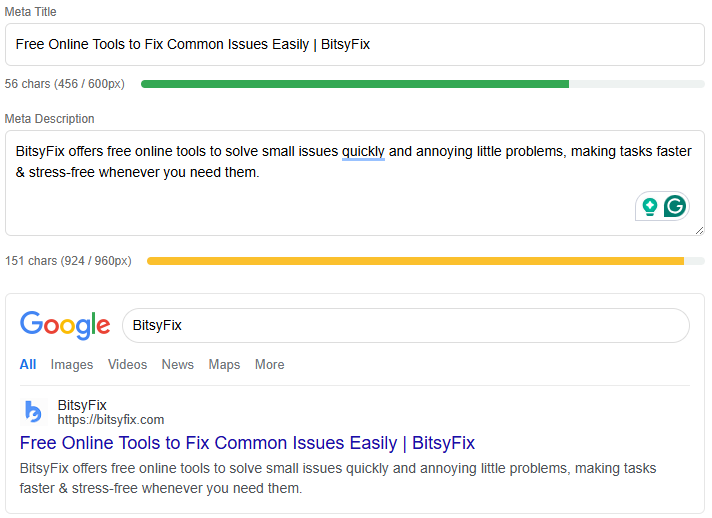
Key Steps When Creating a Snippet
Previewing is only one step in snippet optimization. It shows how your title and description will appear, but you still need to write them clearly and naturally. A strong snippet balances SEO with readability, drawing users in while accurately reflecting your page. Below are the key steps to create an optimized snippet:
- Write a clear, descriptive title that captures the main topic of your page.
- Add a meta description summarizing the page’s content in one or two sentences.
- Include your target keyword naturally near the beginning of the title and description.
- Check the pixel width of both fields to avoid truncation.
- Compare how your snippet appears on desktop versus mobile views.
- Test how your snippet looks alongside competitors for similar queries.
- Make small adjustments until the snippet feels both readable and inviting.
Following these steps ensures that your snippet is accurate, attractive, and well-structured for Google’s display format.
Best Practices for Titles and Meta Descriptions
While Google sometimes rewrites snippets, crafting clear and relevant titles and meta descriptions still makes a big difference. Well-optimized snippets can influence how users perceive your page even when minor edits occur. Here are a few best practices to guide you:
- Keep titles under roughly 55 to 60 characters, or around 600 pixels.
- Keep meta descriptions under roughly 150 to 160 characters, or around 920 pixels.
- Write for users first, but include your main keyword where it fits naturally.
- Avoid repeating the same phrases across multiple pages.
- Focus on clarity, not creativity—users should understand immediately what your page offers.
- Include a small benefit or reason to click, like a promise of learning something specific or solving a problem.
- Maintain consistent formatting and tone across your site to build familiarity.
A quick SERP preview check ensures that these details display correctly in both layouts.
Common Mistakes to Avoid When Writing Snippets
Many snippets underperform due to simple, preventable mistakes. Recognizing these early can help you avoid losing clicks or visibility. Here are the most common errors to watch out for:
- Ignoring pixel limits — long titles may look fine in your editor but get cut off on Google’s results.
- Overstuffing keywords — this can make your snippet look spammy and unnatural.
- Forgetting mobile formatting — text may wrap differently on mobile, breaking flow or hiding important words.
- Reusing meta descriptions — duplicate text across pages confuses users and search engines.
- Neglecting readability — even if a snippet is technically correct, it should still sound natural and inviting.
- Leaving the description blank — if you don’t provide one, Google may pull random text from your page that doesn’t reflect your content well.
Avoiding these mistakes keeps your snippet clean and optimized for better visibility.
Examples of Well-Optimized Snippets
Good snippets are concise, descriptive, and aligned with the page’s main keywords. They clearly summarize what users can expect while encouraging clicks. Below are a few examples that show how proper optimization works in practice:
- Informational blog example
- Title: What Is Technical SEO? A Beginner’s Overview
- Description: Understand the basics of technical SEO, from crawlability to site speed, and how to improve your website’s search performance.
- Tool or product page example
- Title: Free SERP Simulator | Test Your Page Snippets Instantly
- Description: Preview how your title and description appear on Google’s desktop and mobile results before you publish your page.
- Service page example
- Title: SEO Audit Services | Improve Rankings and Site Health
- Description: Identify technical issues and keyword gaps with a professional SEO audit that strengthens visibility and overall performance.
Each of these examples fits within recommended limits and provides a clear reason for users to click.
How SERP Previews Support Your Overall SEO Strategy
A good snippet does more than make your result look appealing — it plays a key role in your overall SEO strategy. It can strengthen relevance, boost engagement, and indirectly support better rankings. Here’s how:
- Improved CTR signals to Google that users find your listing relevant, indirectly helping ranking stability.
- Better alignment between page content and snippet text improves keyword consistency.
- Strong first impressions enhance brand trust and encourage return visits.
- Testing snippets across multiple pages can highlight which types of phrasing attract the most clicks.
- Cleaner snippets reduce bounce rates by setting accurate expectations before users land on your page.
Previewing and refining snippets is an easy way to strengthen multiple SEO factors at once.
How Often to Review and Update Your Snippets
Snippet performance can shift over time as search trends and algorithms evolve. It’s a good practice to review and update your titles and descriptions regularly to keep them accurate, engaging, and aligned with user intent.
- Recheck snippets after major content updates.
- Review analytics monthly to identify pages with low CTR despite good rankings.
- Test new title variations when you see click-through decline.
- Refresh older meta descriptions to include new data, insights, or value points.
- Use previews again after significant design or structure changes on your site.
Small updates can keep your content competitive and visible as search behavior evolves.
Final Thoughts
A Google SERP preview helps bridge the gap between content creation and search visibility. It allows you to refine titles, descriptions, and structure before publishing, ensuring your pages look their best on search results.
By previewing ahead of time and applying best practices, you improve both user experience and click performance. While it only takes a few minutes, the impact on your SEO can last for months.
Using a simulator or preview tool lets you see what your audience will see—making your snippet not just visible, but compelling.